

티스토리 뷰
기존에 Figma dev mode 와 github copliot 을 이용하여 figma mcp 를 사용했는데, Framelink 를 이용해서 무료 버전도 가능하여 도입하게 되었습니다.
생각보다 방법도 많이 간단해서 유용하게 사용하면 될 것 같습니다.
사용 방법
FIGMA_API_KEY 발급하러가기
- 피그마에서 Settings/Sequrity 접속
- Access Token 발급

Cursor 에서 Figma mcp 등록 (아래 링크를 따라하면 됨)
https://www.framelink.ai/docs/quickstart
Quickstart - Framelink MCP for Figma Reference
If you need more support to get your IDE configured, check out the official docs for your editor. You can also join our Discord if you need assistance.
www.framelink.ai
Mac/Linux
{
  "mcpServers": {
    "Framelink MCP for Figma": {
      "command": "npx",
      "args": [
        "-y",
        "figma-developer-mcp",
        "--figma-api-key=YOUR-KEY",
        "--stdio"
      ]
    }
  }
}
Windows
{
  "mcpServers": {
    "Framelink MCP for Figma": {
      "command": "cmd",
      "args": [
        "/c",
        "npx",
        "-y",
        "figma-developer-mcp",
        "--figma-api-key=YOUR-KEY",
        "--stdio"
      ]
    }
  }
}
사용하기
등록이 안료되었으면 피그마에서 url copy
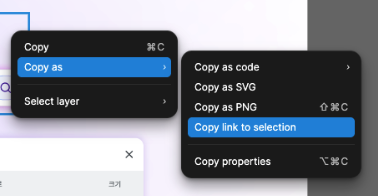
똑같이 커서에 해당 url 을 기준으로 커서에게 요청하면 됩니다.
'업무 메모..' 카테고리의 다른 글
| Claude Code .claude 폴더 사용 가이드 (0) | 2026.01.21 |
|---|---|
| AX 자동화시 AI 인프라 구축에 필요성 (0) | 2025.12.16 |
| 모노레포 구조에 supabase 연동하기 (2) | 2025.08.18 |
| Figma MCP + VSCode + Github Copilot 가이드 (3) | 2025.08.05 |
| AI 모델을 확장하는 두 가지 접근 방식 (5) | 2025.07.10 |
공지사항
최근에 올라온 글
최근에 달린 댓글
- Total
- Today
- Yesterday
링크
TAG
- vue composition api
- seo
- nextjs14
- Zustand
- 스벨트
- AWS
- openAI
- nodejs
- 티스토리챌린지
- Github Actions
- svelte
- vscode
- nextjs13
- NextJS
- cors
- Git
- 깃허브
- React
- 모노레포
- vue router
- 오블완
- 서버 to 서버
- nextjs15
- github
- nuxt2
- 타입스크립트
- Vite
- NUXT
- Ai
- ChatGPT
| 일 | 월 | 화 | 수 | 목 | 금 | 토 |
|---|---|---|---|---|---|---|
| 1 | 2 | 3 | ||||
| 4 | 5 | 6 | 7 | 8 | 9 | 10 |
| 11 | 12 | 13 | 14 | 15 | 16 | 17 |
| 18 | 19 | 20 | 21 | 22 | 23 | 24 |
| 25 | 26 | 27 | 28 | 29 | 30 | 31 |
글 보관함